Clean up or migrate: deciding whether your CRM is fixable or finished

By Robin Laseur

There is a line in next quarter’s budget for a CRM migration, and the justification is one word everyone in the room agrees with: the CRM is a mess. Duplicate contacts, three spellings of the same company, deals attached to the wrong account, reports nobody trusts. The instinct is to escape it into a clean new platform and a fresh start. Before that gets approved, it is worth separating the mess from the diagnosis, because they are not the same thing.
CRM cleanup vs migration is not really a question about how messy your data is. It is a question about where the mess lives. If the mess is in the data, meaning duplicates, stale records, and inconsistent formats, cleanup fixes it and migration only relocates the problem. If the mess is in the model, meaning the structure no longer matches how the business works, no amount of cleaning holds and the fix is a rebuild. The messiness is the symptom. The location is the decision.
What “cleanup vs migration” is really asking
Two operations sit behind the phrase, and they solve different problems. Cleanup is the work of correcting the records: deduplicating contacts and companies, standardizing formats, enriching or archiving incomplete rows, and merging the three versions of the same account into one. Migration is the work of moving those records into a different system, with all the field mapping, integration rebuilding, and testing that involves. Cleanup improves the data you have. Migration changes the container it lives in.
The decision hinges on a third thing that most of the advice skips: your data model. A data model is the structure that governs how your CRM holds information, which objects exist (contacts, companies, deals, tickets), what properties they carry, how they associate with each other, and the rules that keep them consistent. HubSpot’s own framing is useful here, that a CRM is only as useful as the data model behind it, because the model is the structural blueprint, not a technical detail. When the model matches how your business actually operates, dirty data is a hygiene problem. When the model does not, dirty data is a symptom, and cleaning it just resets the clock until the drift returns.
So the real question is not “how bad is it.” It is “is the badness in the records, or in the structure holding them.” That distinction is what separates a fixable CRM from a finished one.
Why “clean before you migrate” skips the decision you are actually making
Search this topic and almost every guide gives the same answer: clean your data before you migrate, never during, never after. It is correct advice. It is also the answer to a different question. “Clean before you migrate” assumes the migration is already decided and only sequences the cleanup around it. The decision you are standing in front of comes one step earlier: should you migrate at all, or does cleanup on your current platform solve the problem.
That earlier decision is the one the guides leave unowned, and it is the expensive one to get wrong. Approve a migration when the mess was only in the data, and you have paid for a platform change to solve a hygiene problem, then imported the same duplicates into a system where they cost several times more to fix, by broad practitioner consensus. Run a cleanup when the mess was in the model, and the records drift back into the same shape within a quarter, because the structure that produced them never changed. The sequencing advice is sound once you have decided to move. It cannot tell you whether to move.
Migration is also not the low-risk default it can feel like when you are frustrated with the current system. A large share of CRM migrations run over their timelines or hit significant data problems, by widely reported industry estimates, and the failure mode is rarely the import itself. It is deciding to move before diagnosing what was actually broken.
The tell: is the mess in your data or your model
Here is the diagnostic that replaces the frustration. Work through your CRM’s problems and sort each one into two buckets. The bucket it lands in decides the tool.
Signs the mess is in the data, which cleanup fixes: duplicate contacts and companies from years of manual entry, phone numbers and country codes in five different formats, records with no email or no activity in the last year or two, and stale field values that were never updated. These are record-level problems. They accumulate in any CRM that has been in use for years, with duplicate rates commonly reaching double digits, and none of them require a new platform. They require hygiene, and increasingly the platform’s own tooling can automate most of it.
Signs the mess is in the model, which cleanup cannot fix: reports that never reconcile because two teams define the same field differently, a structure with no single owner per field so the same fact is entered three ways, custom properties bolted on over years until nobody knows which one is authoritative, and a shape that reflects how the business worked at setup rather than how it works now. The tell across all of these is that cleaning the records does not hold. You dedupe, standardize, and within a quarter the same disagreement returns, because the thing producing it is structural, not clerical.
The single sharpest test: after a thorough cleanup, would the problems come back. If yes, the mess is in the model and cleanup is treating a symptom. If no, the model is sound and you have a data problem, not a platform problem. Migration only earns its cost when the model is broken and the current platform genuinely cannot hold a better one. That last condition matters more than it looks, and it is where most of the money gets wasted.
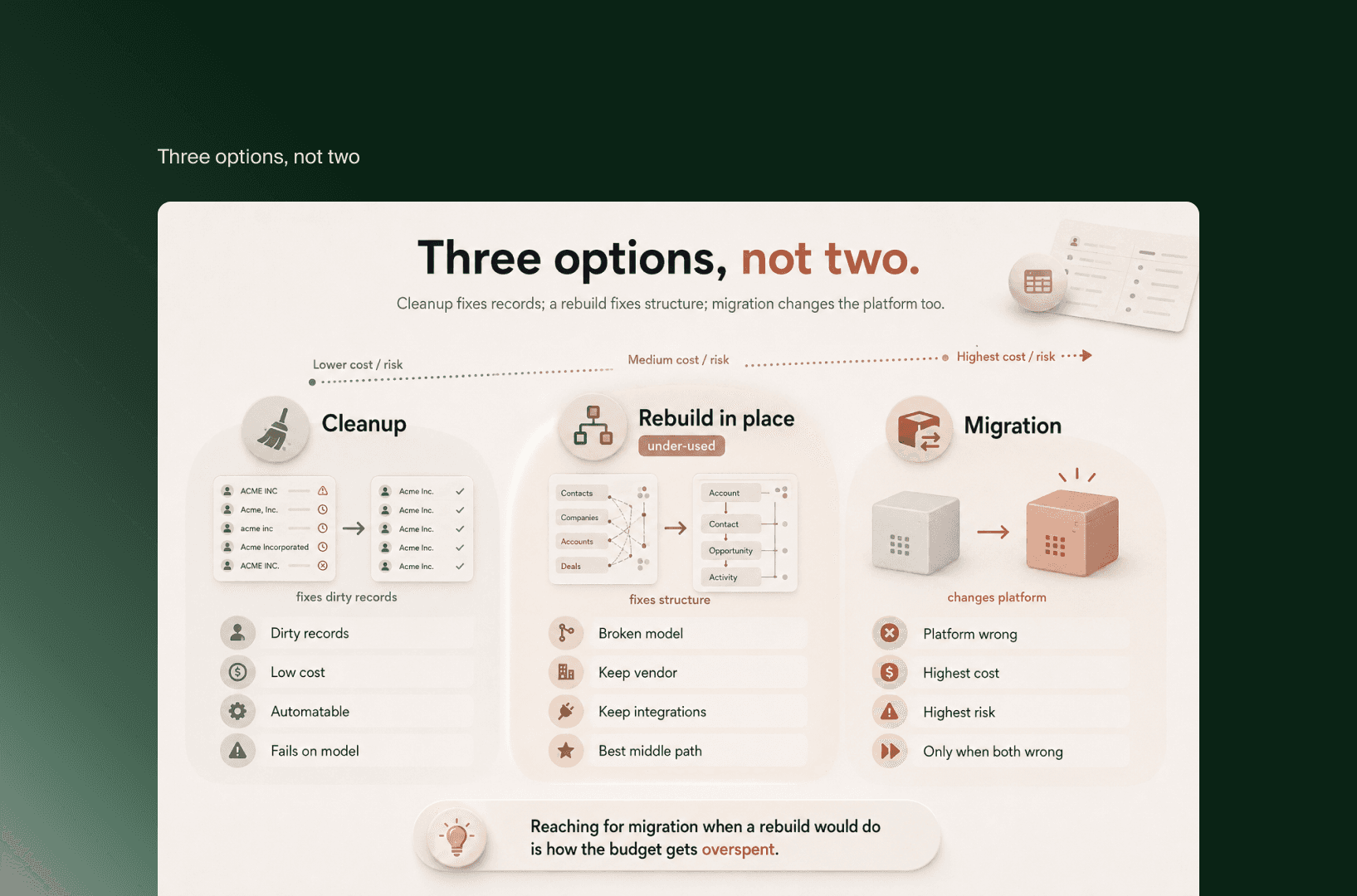
Cleanup, rebuild, and migration, read side by side
The frustration presents the choice as two options, clean or migrate. There are three, and the middle one is the one the migration guides tend to skip because it does not sell a migration.
What you are comparing | Cleanup | Rebuild in place | Migration |
What it fixes | Dirty records | A broken model on a platform that still fits | A broken model plus a platform that no longer fits |
What it leaves untouched | The model (good, if the model is sound) | The vendor and your integrations | Very little, everything moves |
Relative cost and risk | Low, often automatable | Moderate, structural but in-place | High, the riskiest routine project most revenue teams run |
Fails when | The model is the real problem | The platform genuinely cannot hold the model you need | The model was fine and only the data was dirty |
The honest default | Start here for record-level mess | The under-used answer when structure is broken but the tool fits | The right call only when both structure and platform are wrong |
Read across and the logic is plain. Cleanup fixes records. Rebuilding fixes structure without changing vendors, which platforms like HubSpot support directly through their data-management and data-model tooling. Migration fixes structure by changing the platform underneath it, and only pays off when the current platform cannot hold the model you actually need. Reaching for migration when a rebuild would do is the most common way the CRM budget gets overspent.
When cleanup is enough, and when you genuinely need to migrate
Cleanup is enough when your reports reconcile once the duplicates are gone, when the field definitions are agreed even if the values are messy, and when the structure still mirrors your sales, marketing, and service reality. This describes most CRMs that feel like a mess. The disorder is real, but it is at the record level, and a disciplined hygiene pass plus prevention rules at the point of entry resolves it. You do not need a new platform to stop entering “john SMITH” with no company attached.
You genuinely need to migrate when two conditions hold together. First, the model is broken beyond an in-place rebuild, meaning the objects, associations, and rules no longer describe your business and cannot be reshaped within the current tool. Second, the platform itself is now the constraint, because it cannot support the model, the scale, or the integrations you need next. One condition without the other points elsewhere. A broken model on a capable platform is a rebuild. A sound model straining against a platform ceiling is a genuine platform decision, and comparing where you would land, such as HubSpot against Salesforce, is the right next step. Only when both are true is migration the honest answer rather than the frustrated one.
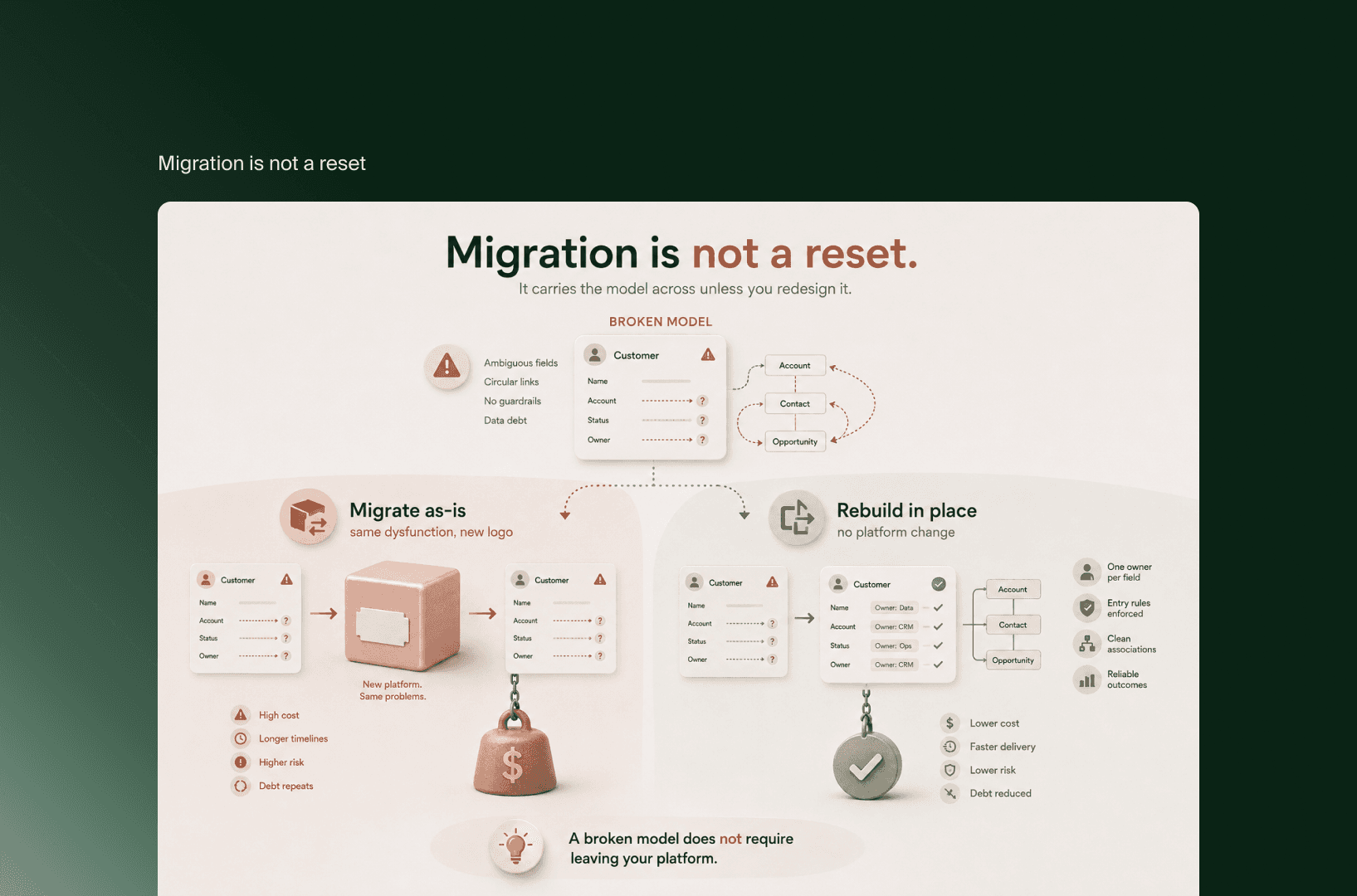
The caveat the migration guides bury: migration is not a reset
The quiet assumption underneath most migration advice is that a new platform is a clean slate. It is not. A migration moves your data model along with your data, unless you deliberately redesign the model as part of the move. Import a broken structure into a new system and you have rebuilt the same dysfunction on a different logo, at considerable cost, with a team now learning unfamiliar software. The often-quoted line that CRM migrations move bad data rather than fixing it applies to structure as much as to records.
The reverse caveat is the one that saves the most money. A broken model does not require leaving your platform. Modern CRMs let you restructure the model in place: redefine objects and properties, fix associations, assign one owner per field, and enforce entry rules going forward. HubSpot positions its customer data management around exactly this, a single consistent record maintained through governance rather than through periodic rescue projects. So “the CRM is finished” is a claim about the model, not automatically about the vendor. Establish which is actually broken, the structure or the platform, before you sign anything. Frustration argues for migration. The diagnosis usually argues for something cheaper.
Frequently asked questions
Should I clean my CRM data before or after migrating?
Before, always, if you have already decided to migrate. Cleaning inside a new system is materially harder and more expensive than cleaning at the source, because you are fighting live workflows and reporting dependencies. But this is the sequencing question, not the decision question. First establish whether you need to migrate at all.
How do I know if my CRM is worth fixing?
Run the return test. After a thorough cleanup, would the same problems come back within a quarter. If no, the model is sound and the CRM is worth fixing with hygiene alone. If yes, the mess is structural and cleanup is treating a symptom, which points to a rebuild or, only if the platform is also the constraint, a migration.
Is a messy CRM always a reason to switch platforms?
No, and treating it that way is how migration budgets get wasted. Most messy CRMs have a record-level problem that cleanup resolves, or a structural problem that an in-place rebuild resolves without changing vendors. Switching platforms is justified only when the model is broken and the current platform genuinely cannot hold a better one.
What is the difference between a data problem and a model problem?
A data problem is dirty records: duplicates, stale entries, inconsistent formats. Cleanup fixes it. A model problem is a broken structure: fields defined differently by different teams, no single owner per fact, a shape that no longer matches the business. Cleanup does not fix it, because the structure keeps regenerating the mess.
Key takeaways
CRM cleanup vs migration is decided by where the mess lives, not how bad it looks. Data mess means cleanup. Model mess means a rebuild or migration.
The dominant advice (“clean before you migrate”) answers a sequencing question and assumes migration is already decided. The real decision comes one step earlier.
Use the return test: if the problems would come back after a thorough cleanup, the mess is structural, not clerical.
There are three options, not two. Cleanup fixes records, an in-place rebuild fixes a broken model without changing vendors, and migration fixes a model when the platform itself is also the constraint.
Migration is not a reset. It carries your model across unless you redesign it, and a broken model can usually be rebuilt without leaving your platform.
Before you approve a migration, run the test for whether the CRM is actually the problem, because the frustration and the diagnosis rarely point to the same fix. Separating a data problem from a model problem, and a model problem from a platform problem, is the kind of read Flatline does as a HubSpot Gold Partner whose consulting practice starts with diagnostics rather than a rebuild. If you want a second opinion on whether yours is fixable or finished before the budget is committed, get in touch and we will work through it with you.
Related articles


F.A.Q.

Should I clean my CRM data before or after migrating?
Before, always, if you have already decided to migrate. Cleaning inside a new system is materially harder and more expensive than cleaning at the source, because you are fighting live workflows and reporting dependencies. But this is the sequencing question, not the decision question. First establish whether you need to migrate at all.
How do I know if my CRM is worth fixing?
Run the return test. After a thorough cleanup, would the same problems come back within a quarter. If no, the model is sound and the CRM is worth fixing with hygiene alone. If yes, the mess is structural and cleanup is treating a symptom, which points to a rebuild or, only if the platform is also the constraint, a migration.
Is a messy CRM always a reason to switch platforms?
No, and treating it that way is how migration budgets get wasted. Most messy CRMs have a record-level problem that cleanup resolves, or a structural problem that an in-place rebuild resolves without changing vendors. Switching platforms is justified only when the model is broken and the current platform genuinely cannot hold a better one.
What is the difference between a data problem and a model problem?
A data problem is dirty records: duplicates, stale entries, inconsistent formats. Cleanup fixes it. A model problem is a broken structure: fields defined differently by different teams, no single owner per fact, a shape that no longer matches the business. Cleanup does not fix it, because the structure keeps regenerating the mess.