Shopify Canvas turns the entire online store into an AI design workspace

By Robin Laseur
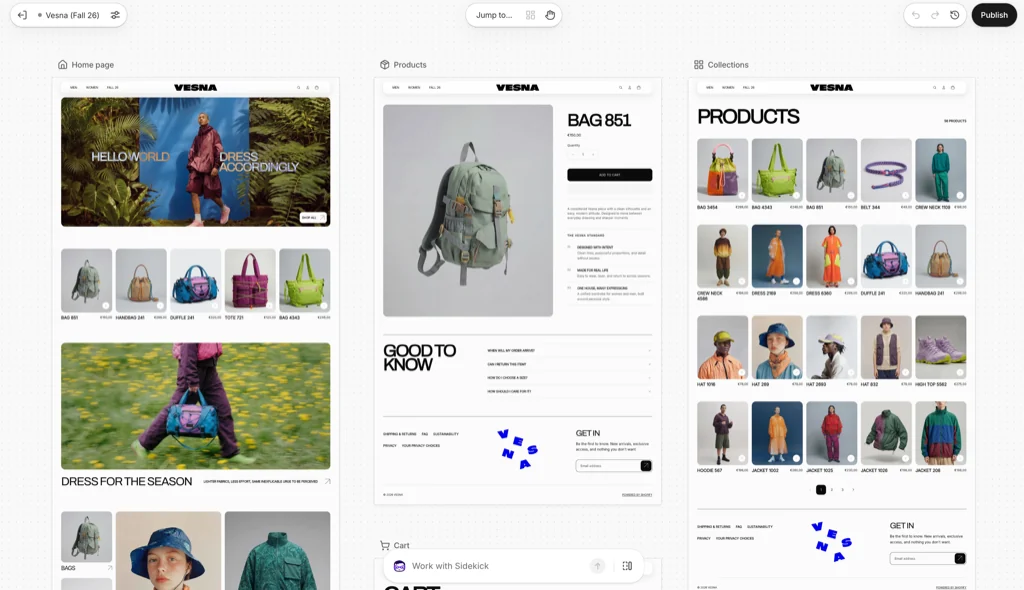
Shopify has introduced Canvas, an early-access workspace that displays a store’s theme templates side by side and lets merchants edit them directly or work with Sidekick to generate theme changes. Canvas can create a theme from a brand description, coordinate changes across theme files, and preview real storefront code. However, access and compatibility remain limited at launch.
Based on those current limits, Canvas appears best suited to merchants using a Shopify-developed or custom theme, working with one shared storefront presentation, and able to test changes on an unpublished theme. It is a weaker fit for stores that require different theme experiences per market, depend heavily on app blocks, use a third-party theme, or run a headless storefront.
The feature began rolling out to selected merchants on 1 October 2026. Shopify describes Canvas as a new design surface for building with Sidekick, but also states that it is early, contains gaps, and does not yet replace the existing theme editor.
What is Shopify Canvas?
Shopify Canvas is a visual workspace for creating and editing an online store theme. Instead of opening one template at a time, merchants can view the store’s templates together, move across the workspace, and zoom into an individual page or block when they need to make a change.
The workspace combines three ways of working:
Ask Sidekick to create or change parts of the theme from a written description.
Select blocks and adjust their available settings.
Edit supported text directly in the storefront preview.
According to Shopify’s Canvas announcement, the preview is not a static visual mockup. Canvas renders the real theme code that Sidekick and the merchant are editing. Merchants can interact with a page, review animations, switch between products or collections on relevant templates, and inspect pages at different screen widths.
This is the most important distinction between Canvas and a general-purpose AI website mockup tool: its documented role is to create and modify a Shopify theme inside the Shopify environment, not merely produce a design that must later be rebuilt.
What changes when merchants build a store with Sidekick?
Sidekick was already able to generate theme sections and make code changes. Canvas expands that workflow from an isolated request-and-response interaction into a shared visual environment.
Shopify says Sidekick can now work directly across the files and templates that make up a theme. It can propose a direction, ask follow-up questions, apply coordinated changes, validate its code, and inspect screenshots of the result before returning the work to the merchant. Changes made by Sidekick appear in Canvas as they are produced, allowing the merchant to review them in the context of the wider store.
Shopify also says Sidekick remembers preferences and earlier design choices. This is intended to reduce the need to repeat the same visual direction in every prompt. The merchant still reviews the output and controls whether the updated theme is published.
The workflow supports both ends of the starting spectrum. A merchant can begin with a broad description of the brand and ask Sidekick to build a new theme, or bring a more defined visual direction and refine the generated implementation inside Canvas.

How Canvas works from theme creation to publishing
The current documented workflow begins on the Online Store > Themes page in Shopify admin.
Create a new theme from a brand description
Merchants with access can select New and describe their brand and the store they want to build in Sidekick. Sidekick generates the theme and opens it in Canvas. Shopify adds the result to the theme library as an unpublished theme, so customers do not see it until the merchant publishes it.
Duplicate a supported theme into Canvas
For an existing supported theme, merchants can select Duplicate in Canvas. The duplicated version opens in Canvas while the original remains in the theme library.
The two versions are separate. Changes made to the Canvas copy are not added to the original theme, and changes to the original are not synchronized back into the Canvas version. Teams therefore need to confirm which version contains the latest approved work before publishing.
Edit the theme visually or through Sidekick
Canvas first presents a zoomed-out overview of the store’s templates. A merchant can open a template, select a block, change its settings, edit supported text in place, or submit a request through the Work with Sidekick field.
The full-screen view includes an inspector for selecting blocks and a browsing mode for navigating the storefront as a customer would. Merchants can also inspect preset desktop, tablet, and mobile widths or adjust the preview width manually.

Review, restore, and publish
Canvas saves changes automatically. Saving does not make them public.
For an unpublished theme, Publish makes the theme live. For a live theme with saved Canvas changes, Update opens a review step before the merchant confirms Publish changes. If Shopify detects an error that prevents publication, the publishing dialog can offer a Fix with Sidekick option.
Canvas also includes version history. A merchant can review an earlier version and restore it, but the restored version is not visible to customers until it is published.
There is one undo behaviour teams should understand. Shopify’s documentation says ordinary manual edits can be undone or redone from the top bar. When Sidekick makes a change, however, the existing undo history is cleared. Reversing a Sidekick change requires another request to Sidekick or restoring an earlier version from theme history.
Canvas is in early access, and its compatibility boundaries matter
Canvas is not currently a universal replacement for Shopify’s established theme workflow. The official requirements and considerations establish several launch constraints.
Area | Current documented requirement or limitation |
|---|---|
Availability | Early access for selected stores; Shopify says rollout is occurring over the days following the announcement |
Device | Desktop only |
Plan | A plan that includes theme customisation is required to edit or publish |
Theme support | Shopify-developed themes and custom themes are supported; third-party themes are not supported |
Staff permission | Online store > Themes > Edit code is required |
Theme updates | A theme edited in Canvas no longer receives theme updates |
Theme files | Theme files for a Canvas-edited theme cannot be downloaded |
Translation | Theme content cannot be translated directly in Canvas; Shopify directs merchants to Translate & Adapt |
App extensions | App blocks and app embeds cannot be added or configured in Canvas |
Markets | Theme customisation for individual markets is not available in Canvas |
Rollouts | A Canvas theme can replace the main theme in a rollout, but a rollout cannot be used to edit or open that Canvas theme |
Metaobjects | Metaobject templates do not appear in Jump to... |
These are operational boundaries, not small interface details. A store that depends on a third-party theme cannot currently bring that theme into Canvas. A multi-market store cannot use Canvas to maintain market-specific theme variations. A team that relies on theme update delivery or downloadable theme packages also needs to understand that editing a theme in Canvas changes those workflows.
The app limitation requires precise interpretation. Shopify states that merchants cannot add or configure app blocks or app embeds in Canvas. The current documentation does not fully describe every behaviour of previously configured app extensions after a supported theme is duplicated. Merchants with app-dependent product pages, search, reviews, subscriptions, personalisation, or analytics should therefore verify each dependency in a draft before considering publication.
Which merchants are the best fit for Shopify Canvas today?
Canvas compatibility is better evaluated from the structure of the storefront than from company size alone. Based on Shopify’s current documentation and the storefront architectures Flatline works with, our view is that Canvas has a clearer early fit where the theme layer is relatively unified. This is a bounded interpretation of the documented constraints, not a claim based on Flatline production testing of Canvas.
Merchant or storefront setup | Current fit | Why |
|---|---|---|
A new single-market store using a Shopify-developed or custom theme | Strong early candidate | The merchant can create or duplicate a supported theme, work in a draft, and use one shared design system without market-specific theme variations. |
An established merchant planning a brand refresh on a custom theme | Potential fit after dependency review | Canvas can coordinate changes across templates, but the team must first verify app extensions, translations, release procedures, and the loss of downloadable theme files and upstream theme updates. |
A multi-country store using the same layout and theme settings in every market | Potential fit, subject to testing | Shopify’s documented limitation concerns market-specific theme customisation rather than the number of countries served. A shared presentation may therefore fit, but Flatline has not verified this configuration in a production Canvas account. |
A multi-market store with different navigation, layout, blocks, or visual merchandising per market | Weak fit in the current release | Canvas cannot currently customise a theme for different markets. The team would need to preserve that work outside Canvas or wait for the capability to change. |
A store with app-heavy product, cart, search, subscription, or personalisation experiences | Conditional fit | App blocks and app embeds cannot be added or configured in Canvas. Every critical app-rendered experience therefore needs separate verification on the draft theme. |
A merchant using a third-party Theme Store theme | Not currently supported | Shopify currently limits Canvas to Shopify-developed and custom themes. |
A headless Shopify storefront built with Hydrogen or another frontend | Not a direct fit | Canvas is documented as a theme workspace. A headless storefront uses a separate frontend architecture and deployment workflow. |
A team that requires downloadable theme packages, upstream theme updates, or strict code-release controls | Weak fit without a revised workflow | Canvas-edited themes cannot be downloaded and no longer receive theme updates, changing how the team reviews, versions, transfers, and maintains theme code. |
Country count is not the constraint; market-specific theme customisation is
Shopify does not list the number of countries or markets as a Canvas eligibility requirement. The documented limitation is that merchants cannot customise a theme for different markets inside Canvas. Country count should therefore not be treated as a formal eligibility rule.
Based on the current documentation, Flatline’s interpretation is that a multi-country store may remain within Canvas’s practical scope when every market shares the same theme structure and presentation. This is an inference from Shopify’s documented limitation, not a configuration that Flatline has verified in a production Canvas account.
A single-country merchant is not automatically a good fit. The store may still rely on a third-party theme, several app embeds, translated content, or a release process that requires downloadable theme files. Conversely, selling across several countries is not necessarily the blocker when those markets use the same navigation, page composition, blocks, and theme settings.
The relevant verification question is therefore not simply “How many countries do we sell in?” It is “Which market differences are implemented in the theme layer?” If a market requires different navigation, page composition, promotional blocks, or other theme-level presentation, the current release does not provide the necessary market-specific control. If market differences are managed outside the theme layer, the setup may still be a candidate, but it should be verified on the merchant’s actual store before Canvas is adopted.
Four practical early use cases
The documented feature set points to four realistic use cases that merchants can evaluate without assuming Canvas is ready to own the entire storefront workflow.
Creating a first theme direction for a new store. A merchant with early access can describe the brand to Sidekick, receive an unpublished theme, and turn an abstract direction into something concrete to review. This is most straightforward when the store starts with a supported theme path and limited app dependencies.
Exploring a brand refresh across multiple templates. Because Canvas displays templates together, a team can examine how typography, colour, sections, and visual direction carry from the homepage into product and collection templates. The draft still needs functional and responsive verification before publication.
Prototyping a campaign or merchandising direction. A team can duplicate a supported theme, ask Sidekick to explore a coordinated presentation, and keep the original theme separate. This supports visual exploration without making the first iteration visible to customers.
Reducing handoffs during bounded theme changes. Designers, ecommerce managers, and developers can review the same rendered theme while Sidekick applies changes to the underlying files. This is most useful when the request stays within Canvas-compatible theme elements and does not depend on unsupported app or market configuration.
These use cases are deliberately narrower than “build any Shopify storefront with AI.” They reflect where the documented mechanics and current constraints align. A merchant should still test the final theme against its own app stack, content model, accessibility requirements, analytics, SEO output, and release controls.
What Canvas changes for designers, developers, and ecommerce teams
Canvas reduces the distance between a design request and working Shopify theme code. A merchant can describe an outcome, see Sidekick implement it, and review the live theme rendering without passing a static mockup through a separate build stage.

That does not mean every storefront task has become a prompt-only task.
Canvas is currently focused on theme-based online stores. It does not replace the separate architecture used by headless storefronts. Flatline’s comparison of Liquid and Hydrogen storefront development explains that Hydrogen uses a React-based frontend and a different deployment workflow, while Canvas documentation is specifically framed around Shopify themes.
The current limitations also preserve important work for technical teams. Someone still needs to verify app behaviour, translations, market-specific requirements, accessibility, analytics, SEO output, performance, and interactions that extend beyond the theme preview. The ability to generate working code changes the production method, but it does not by itself verify the resulting customer experience.
For teams already exploring Shopify’s AI capabilities, Canvas is also a distinct workflow from using Sidekick elsewhere in the admin. Flatline’s guide to Shopify admin and Sidekick covers the broader administrative assistant, while Canvas concentrates the interaction on theme creation, visual inspection, and storefront code.
What merchants should check before publishing a Canvas theme
Because Canvas is early access, the safest evaluation happens on an unpublished theme rather than through an immediate live-store edit. The following checks follow directly from Shopify’s documented requirements and publishing workflow:
Confirm that the store and theme are eligible. Check that Canvas appears in the theme library, the store’s plan includes theme customisation, and the theme was developed by Shopify or is a custom theme.
Confirm staff permissions. Anyone opening Canvas needs the Edit code theme permission, which should be granted deliberately because Canvas can change theme files.
Record the theme workflow that will change. Determine whether the team depends on upstream theme updates or downloadable theme files, as both are affected after editing in Canvas.
Inventory app blocks and app embeds. List the storefront features supplied by apps and verify them on the Canvas theme. Do not assume the inability to configure an app inside Canvas proves either that the existing integration works or that it fails.
Review translation and market requirements outside Canvas. Identify content managed through Translate & Adapt and any market-specific theme settings before deciding whether Canvas fits the store’s operating model.
Test representative templates and screen widths. Review the homepage, product, collection, cart, search, content, and any custom templates that matter to the customer journey. Use both interaction mode and the desktop, tablet, and mobile previews.
Review version history before publication. Sidekick changes clear the ordinary undo history, so confirm that a usable restore point exists before accepting a store-wide change.
Validate the live result after publishing. Canvas provides a working preview, but the live storefront remains the final environment for checking app behaviour, analytics, SEO elements, accessibility, and performance.
This checklist does not assume that Canvas output is defective. It reflects the boundaries Shopify has documented for the early-access release.
Does Shopify Canvas replace the theme editor or a development partner?
Not yet. Shopify explicitly says Canvas is not replacing the existing editor at this stage. The product is in early access, access is limited, and several established theme workflows are not supported inside Canvas.
For a merchant creating a new supported theme or exploring a substantial visual change, Canvas can make ideation and implementation happen in the same environment. For a store with a third-party theme, multiple markets, app-heavy templates, formal release processes, or headless architecture, the current compatibility boundary is more consequential.
The practical question is therefore not whether Canvas eliminates design or development work. It is which parts of a store’s current theme workflow Canvas can safely own today, and which dependencies still require separate tools or technical verification.
Flatline has not yet independently tested Canvas in a production merchant account. For teams evaluating the early-access release, Flatline can help map the existing theme, app, market, and release dependencies against Shopify’s documented Canvas constraints before any production decision is made. For broader storefront work, see Flatline’s Shopify Plus development capabilities.
Related articles


