How Real-Time Inventory Actually Stays in Sync Across Your Store and Online (Shopify)

By Robin Laseur

On Shopify, the single stock number holds because your online store and your POS are not two systems being kept in step. They read and write the same per-location inventory record in real time, split into states that track exactly how much stock exists, how much is spoken for, and how much can still be sold. When a POS sale and a web order hit the same variant, both touch that one record, so the count moves once and stays true. That is real synchronisation by design, not a scheduled reconciliation. It breaks in four specific places, and knowing where lets you tell a genuinely unified setup from one that only looks synced. This explains the mechanism end to end.
Where the single stock number actually lives
Shopify does not track one number per product. It tracks several, per location, and the relationship between them is the whole mechanism. According to Shopify’s inventory documentation, every variant at every location carries a set of states: On hand, Available, Committed, Unavailable, and Incoming.
On hand is the total physical quantity at a location, everything in the building whether or not it can be sold right now. Committed is stock already allocated to open orders that have not been fulfilled yet. Unavailable is stock set aside and not sellable, for example units held by a draft order or flagged as damaged. Incoming is stock expected from a supplier or a transfer that has not arrived. Available is the one the storefront cares about: it is what remains after the others are removed, calculated as On hand minus Committed minus Unavailable, and it excludes Incoming entirely.
That subtraction is the core of the system. Available is the number that can be promised to a new customer, and Shopify recalculates it automatically as the others change. If a location holds 40 on hand and 6 are committed to orders waiting to be packed, Available is 34. Those 34 are what a shopper can buy, online or in store, and nothing else should be sold against that variant at that location until the numbers move. The 40 has not changed, but only 34 of it is real for the purpose of a new sale.
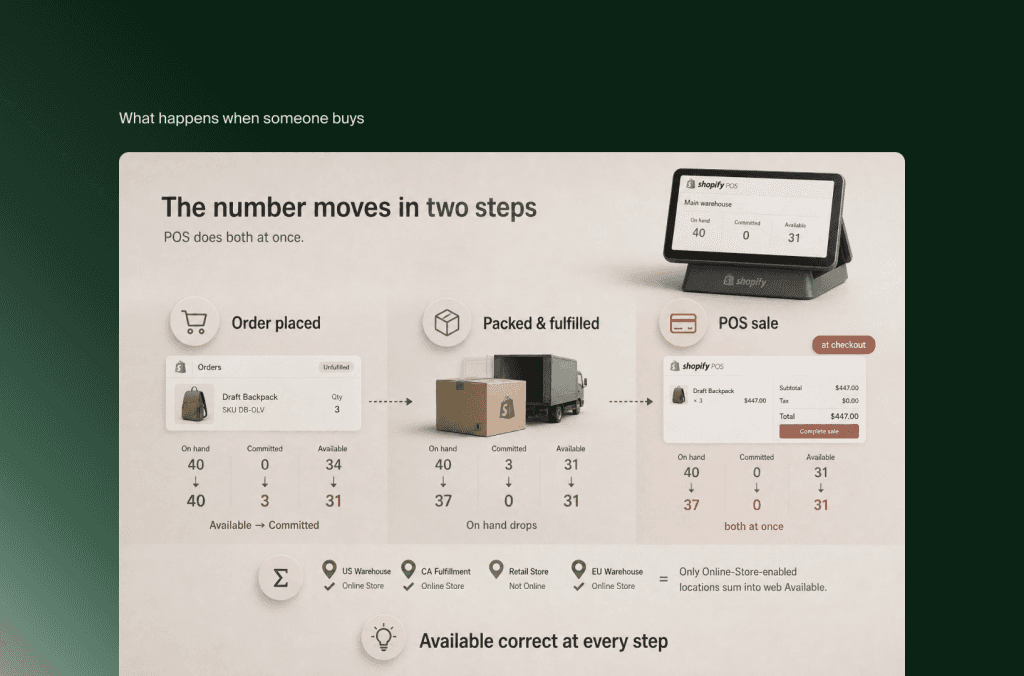
What happens to the number when someone buys
Follow a single unit through a purchase and the sync mechanism becomes visible.
A customer places an online order for three units. Shopify does not reduce On hand yet, because the stock is still physically in the location. Instead it moves three units from Available into Committed. On hand stays the same, Available drops by three, and those three are now reserved for that order. When staff pack and fulfil the order, Committed for it returns to zero and On hand finally decreases, because the stock has physically left. The number moved in two steps, reservation then departure, and Available was correct at every point in between.
A POS sale works the same way against the same record, but compresses the steps: the transaction commits and fulfils in the moment of checkout, so the store location’s count moves immediately. Because Shopify POS now surfaces On hand and Unavailable states directly at the register alongside Committed, staff see the same truth the website is working from, which is what reduces accidental overselling at the counter.
The last piece is how the website decides what is buyable. Online storefront availability for a product is the sum of Available across the locations assigned to the Online Store channel. A location that is not enabled for that channel does not contribute its stock to the website, even if it is physically full. This matters later, because it is one of the places the mechanism quietly diverges from what a merchant assumes.
Inside this loop, online and POS are unified in the strict sense: they are not exchanging files, they are operating on one set of location-level states that update as transactions land. There is nothing to reconcile because there are not two numbers to reconcile.
Why synced and unified are not the same thing
This is the distinction that decides whether your setup is trustworthy. A unified system shares the record. A synced system keeps a separate copy and updates it on a cadence, which means that between updates, the two disagree, and every disagreement is a chance to sell something that is not there or hide something that is.
Native Shopify online plus Shopify POS is unified because both act on the same states. The moment a third participant enters that does not share those states, a marketplace channel, a 3PL, an ERP, a second POS, a returns process handled off-platform, that participant is synced, not unified. It reads a number, acts on it, and reports back later. The gap between its view and Shopify’s view is where the four failures live. Every one of them is a version of the same root: something read or wrote the record without respecting the states it is built on.
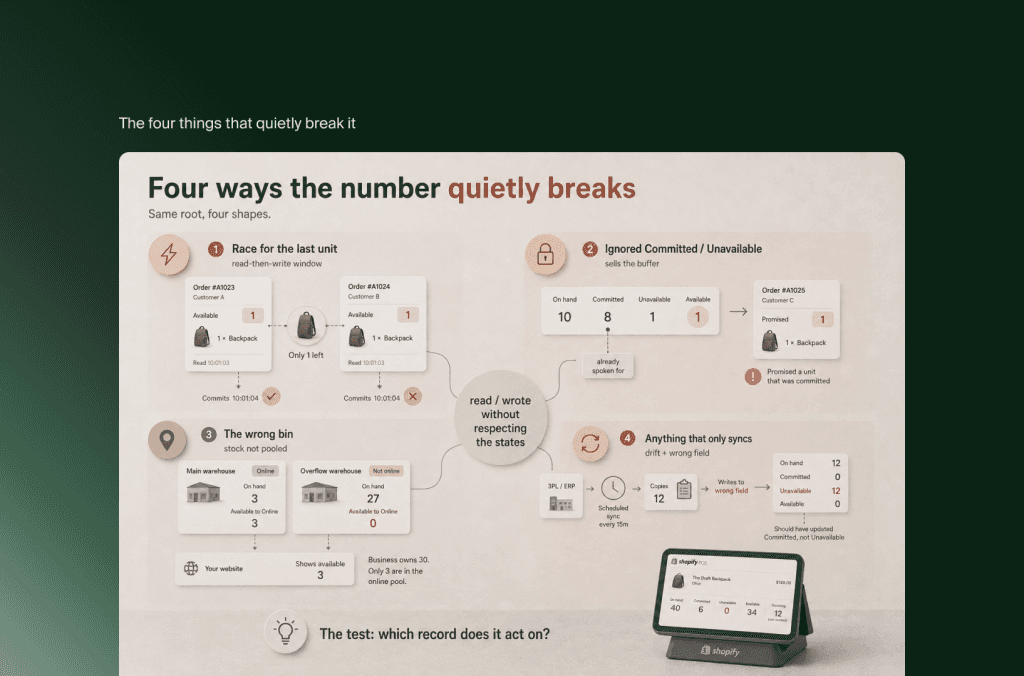
The four things that quietly break it
Each of these is a condition, not an inevitability. Understanding the mechanism tells you which ones apply to your setup.
1. The race for the last unit
The window between reading Available and writing Committed is small, but it is not zero. When two orders for the same last unit arrive almost simultaneously, and one channel or app checks Available before the other’s Commit has registered, both can be accepted against stock that only covers one. The result is an oversell that no single system did anything wrong to cause: each read a number that was true at the instant it was read.
Shopify’s own admin performs the subtraction correctly, so this rarely originates inside native online-plus-POS. It appears when an external channel or app holds its own cached Available and sells against a stale copy, or when a product is set to continue selling when out of stock, which deliberately bypasses the check. The condition to watch for is any sales surface that reads a copy of the number rather than the live record.
2. Stock that is spoken for but not sold
Committed and Unavailable are the reservation mechanism, and both directions of getting them wrong cause a visible fault. If a system reads On hand and treats it as sellable, ignoring the units already Committed, it will promise stock that is physically present but already inside other orders, and a later customer buys a unit that does not exist for them. If instead Available is set once and not recalculated as Committed changes, stock can show as sold out while units sit free on the shelf. Draft orders add a subtler version: they move stock into Unavailable, which can make a variant look out of stock for reasons a merchant has forgotten about. The condition here is any integration or workflow that touches stock without reading and respecting Committed and Unavailable the way the storefront does.
3. The wrong bin
Shopify’s multi-location model treats each location’s inventory as independent. Stock is not pooled across locations automatically, so which location a channel reads and commits against is a decision with consequences. Several failure conditions follow from this. A product can have On hand at a location while showing Available as a dash, which means it is inactive there and cannot sell or fulfil from that location regardless of physical stock. A retail-only location can hold stock that counts toward your total but not toward the online channel, so the website shows less available than the business owns. And order routing that reserves from a location with low Available can block a sale even when another location has plenty, because that other location is not enabled for the channel. None of these is a sync error. Each is the multi-location logic behaving exactly as configured, against an assumption that inventory is one shared pool.
4. Anything that only syncs
This is where the sync-versus-unified boundary does its damage. A 3PL, an ERP, a marketplace connector, or a returns process handled outside Shopify does not share the states, it copies numbers in and out on a schedule or through an integration. Two conditions dominate. First, timing: between updates, the external system’s view and Shopify’s view drift, and any sale made against the stale side is a sale made against a number that was already wrong. Second, field mismatch: an integration that writes to the wrong state, for example pushing a physical count into Available when it should have updated On hand, silently double-sells committed stock, because it overwrote the buffer the reservation logic depends on. Returns sit inside this too. A return re-adds stock, and whether it lands in Available or in Unavailable pending inspection, and whether the external system even knows the return happened, decides whether the recovered unit stays true. The condition to name is simple: every system outside Shopify’s record is synced, and each one is a place the single number can quietly stop being single.
How to tell whether yours is truly unified or just synced
The mechanism gives you a direct test. For each system that can sell or move stock, ask which record it acts on. If it reads and writes Shopify’s live per-location states, it is unified with the rest, and the number holds by construction. If it holds its own copy and reconciles later, it is synced, and it belongs on the list of places to watch for the four failures above.
Native Shopify online and Shopify POS pass this test together. The question for most operations is how many other participants they have added, and whether each of those respects the states or merely copies the number. Where a marketplace, a 3PL, or an ERP is in the loop, the reliability of the whole depends on how deliberately that connection was built, which is a design decision rather than a setting to switch on. If that boundary is where your risk sits, it is worth mapping the ERP and integration side with the same care as the native core, and it is the kind of setup Flatline builds and audits.
Key takeaways
Shopify keeps one stock number true by tracking per-location states, On hand, Available, Committed, Unavailable, and Incoming, where Available is On hand minus Committed minus Unavailable. Online and POS both act on that same record in real time.
An order moves stock from Available to Committed, then reduces On hand only at fulfilment. A POS sale does both at once. Website availability is the sum of Available across the locations assigned to the Online Store channel.
Unified means sharing that record. Synced means copying the number and reconciling later. The difference is the source of every mismatch.
Four conditions break the sync: a race between reading Available and writing Committed, systems that ignore Committed and Unavailable, multi-location logic assumed to be one shared pool, and any external system that only syncs rather than shares.
To judge your own setup, check which record each selling or stock-moving system acts on. Live states means unified; a separate copy means synced, and a place to watch.
FAQ
Does Shopify POS update online inventory in real time?
Yes. Shopify POS and the online store operate on the same per-location inventory record rather than syncing two separate systems, so a POS sale adjusts the shared count immediately and the website reflects it without a scheduled update. The exception is any additional channel or system that keeps its own copy of the number.
Why does my Shopify stock still oversell if inventory is real-time?
Usually because something is acting on a stale or wrong version of the number: an external channel selling against a cached Available, an integration that ignores Committed stock, a product set to keep selling when out of stock, or an order routing against the wrong location. Native online-plus-POS rarely oversells on its own, because Shopify calculates Available correctly.
What is the difference between On hand and Available in Shopify?
On hand is the total physical stock at a location, including units already committed to orders or set aside as unavailable. Available is what can actually be sold to a new customer, calculated as On hand minus Committed minus Unavailable. Selling logic should read Available, not On hand.
Related articles


