
AMS01:00
AMS01:00
AMS01:00

eCommerce ﹥ Shopify POS

SHOPIFY POS FOR BRANDS THAT SELL IN STORE AND ONLINE

Retail and online stop competing once they share one stock, one customer and one order history. We implement Shopify POS and connect it to the systems your stores already depend on, from stock and fulfilment to loyalty and finance.

eCommerce ﹥ Shopify POS

SHOPIFY POS FOR BRANDS THAT SELL IN STORE AND ONLINE

Retail and online stop competing once they share one stock, one customer and one order history. We implement Shopify POS and connect it to the systems your stores already depend on, from stock and fulfilment to loyalty and finance.

eCommerce ﹥ Shopify POS

SHOPIFY POS FOR BRANDS THAT SELL IN STORE AND ONLINE

Retail and online stop competing once they share one stock, one customer and one order history. We implement Shopify POS and connect it to the systems your stores already depend on, from stock and fulfilment to loyalty and finance.

Stoov homepage on desktop with an outdoor heated cushion campaign
Stoov webshop on mobile with a heated cushion product page
Shopify analytics dashboard with sales and conversion overview

One stock, or the illusion of it

The hard part of unified commerce is rarely the till. It is deciding which system owns stock, how returns across channels are handled, what staff can see and change, and what happens when the network drops. We map those decisions before installing anything, then implement POS, hardware, roles and integrations around them.

PROVEN
RESULTS
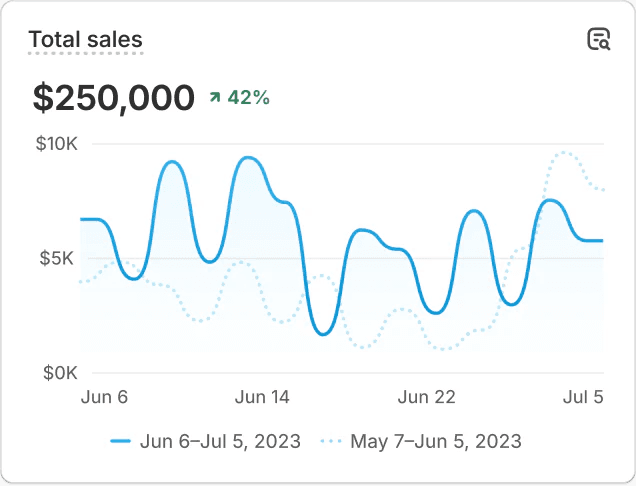
Shopify total sales chart showing 42 percent growth

TOTAL SALES VS. PREVIOUS PERIOD

+0%

+0%

+0%

+0%

+0%

+0%

Three men in summer fashion on a harbour quay

We build and grow digital platforms for brands that expect their commerce to perform, from fashion and beauty to mobility and consumer electronics. These are some of the companies we work with.

We build and grow digital platforms for brands that expect their commerce to perform, from fashion and beauty to mobility and consumer electronics. These are some of the companies we work with.

We build and grow digital platforms for brands that expect their commerce to perform, from fashion and beauty to mobility and consumer electronics. These are some of the companies we work with.

When Shopify POS is the right move

Attendees listening to a talk at a Flatline eCommerce event
Office entrance with a glass meeting booth
Two colleagues discussing work at their desks

Global disruptor in custom development & end-to-end production partner

WHEN POS FITS

Shopify POS fits when your stores and webshop keep separate stock, when staff cannot see an online order, when click and collect is manual work, or when your till system cannot follow the brand into a new market.

Family with two young children next to an electric cargo bike in front of a townhouse

When Shopify POS is the right move

Attendees listening to a talk at a Flatline eCommerce event
Office entrance with a glass meeting booth
Two colleagues discussing work at their desks

Global disruptor in custom development & end-to-end production partner

WHEN POS FITS

Shopify POS fits when your stores and webshop keep separate stock, when staff cannot see an online order, when click and collect is manual work, or when your till system cannot follow the brand into a new market.

Family with two young children next to an electric cargo bike in front of a townhouse

When Shopify POS is the right move

Attendees listening to a talk at a Flatline eCommerce event
Office entrance with a glass meeting booth
Two colleagues discussing work at their desks

Global disruptor in custom development & end-to-end production partner

WHEN POS FITS

Shopify POS fits when your stores and webshop keep separate stock, when staff cannot see an online order, when click and collect is manual work, or when your till system cannot follow the brand into a new market.

Family with two young children next to an electric cargo bike in front of a townhouse
Baskèts store, online and offline on one Shopify stock

Store and webshop as one operation

Shopify POS runs on the same backend as your online store. Products, prices, customer profiles, gift cards and orders are shared, and stock is tracked per location. That is the foundation. Whether it works in practice depends on how you configure locations, order routing and fulfilment rules, because those decide which store or warehouse picks which order.

  • Stock per location, with transfers between warehouse and stores

  • Order routing rules that decide which location fulfils an online order

  • Ship-from-store in POS (POS Pro), so store stock can fulfil online orders

  • Pickup in store for click and collect, with a notification to the customer (POS Pro)

  • Exchanges, and returns of online orders in store (POS Pro)

  • One customer profile and order history across channels

  • Gift cards that work both online and in store

Per location we decide whether it only sells, also fulfils online orders or supplies stock to other stores. That choice affects staffing, packaging, reporting and the way store teams are measured. We therefore make it together with retail operations, not only with the eCommerce team.

POS Pro, hardware and staff roles

Every paid Shopify plan includes basic in-person selling features, formerly known as POS Lite. POS Pro is a paid add-on per location, with features that stores with staff and volume usually need: staff roles and permissions, ship-from-store, exchanges, pickup in store and more extensive inventory and reporting tools. On Shopify Plus, the first 20 POS Pro locations are included. We decide per location which tier is needed, because a pop-up and a flagship store rarely need the same.

Hardware is chosen around the store layout and payment setup: card readers, tablets or phones, barcode scanners, receipt printers and cash drawers. Which Shopify card readers and payment methods are available differs per country, and some regions support Tap to Pay on a phone. We check this for each market before anything is ordered.

Staff log in with their own PIN, and how many can use POS depends on your Shopify plan. With POS Pro, each staff member also gets a role that determines what they can do: give discounts, issue refunds, change prices or manage cash. Sales can then be attributed to individual staff members. That matters when commission or store targets depend on it, and it shows who needs more training.

Offline, integrations and local rules

Shopify POS can keep selling during a network outage, but with limits. Cash and manual payments continue offline. Card payments on supported card readers only work offline if you activate them beforehand, within limits per device and per transaction. They are processed once the connection returns, so a card can still be declined afterwards. Gift cards, returns and exchanges need a connection. We agree in advance what staff do during an outage.

A till rarely stands alone. Store sales need to reach finance, stock movements need to reach the ERP through an ERP integration, and loyalty or clienteling tools need the same customer. We design these integrations with the same care as the till itself, and use POS UI extensions where store staff need a custom workflow on screen.

Local rules count too. In Germany, electronic cash registers must comply with the KassenSichV and be connected to a certified technical security system (TSE). Shopify offers its own TSE (KassenSichV) app for this, with a cloud TSE from Fiskaly and a monthly fee per location. Requirements for receipts, tax and invoices also differ per country, and France and Spain have their own fiscal rules, so we check them for each market during the design phase.

How we roll out Shopify POS

  1. Store and process visit. We spend time in a store and with the operations team to map checkout, returns, stock counts, receiving goods and what happens at opening and closing time.

  2. Stock and fulfilment design. We define locations, stock ownership, order routing and the rules for ship-from-store and click and collect, and decide which system leads for stock and prices.

  3. Hardware and payment setup. We select card readers, scanners and printers per store layout, check availability per country and set up payments, receipts, tax settings and any local fiscal requirements.

  4. Roles and integrations. We configure staff roles, permissions and PINs, connect finance, ERP, loyalty and other systems, and test sales, refunds, exchanges and transfers across all channels.

  5. Pilot store. One store goes live first, with staff trained on real scenarios. During the first weeks we collect issues and adjust settings before the next stores follow.

  6. Rollout and aftercare. The remaining stores follow in planned waves, outside peak periods. After go-live we monitor sync, stock accuracy and staff questions, and refine roles and routing where needed.

Online and offline as one

F.A.Q.

We’d love to answer all your questions

What does Shopify POS cost?

The costs consist of your Shopify plan, POS Pro per location where needed, hardware, card payment fees and the implementation. On Shopify Plus, the first 20 POS Pro locations are included. Integrations with ERP, finance or loyalty often account for most of the project budget. Shopify publishes current POS Pro and hardware prices per country. We map the rest after the store visit, so you compare complete costs rather than a licence fee.

How long does a Shopify POS rollout take?

It depends on the number of stores, the integrations and hardware delivery times. A single store without complex integrations can switch relatively quickly. A chain with ERP, loyalty and ship-from-store needs design, testing and a pilot first. We plan the rollout around your trading calendar, so no store switches during a peak period.

What happens if the internet goes down?

Shopify POS can keep processing some payments offline, depending on payment method, card reader and region. Orders and stock sync once the connection is back. It does not replace a stable connection. We advise on backup connectivity, such as a mobile hotspot, and agree clear procedures with store staff for what to do during an outage.

Can Shopify POS connect to our ERP and loyalty programme?

Usually yes, through existing apps, middleware or a custom integration, depending on the systems involved. The key decisions are which system owns stock and prices, how often data syncs and how store sales reach finance. We test these flows with real store scenarios such as exchanges, partial returns and transfers between locations.

What support do stores get after go-live?

We train key users in each store, document procedures and monitor the first weeks after every rollout wave. Questions about Shopify’s own hardware and payments go through Shopify Support. Configuration, integrations and process changes can stay with us, for example on a retainer, so store teams know who to contact for what.

F.A.Q.

We’d love to answer all your questions

What does Shopify POS cost?

The costs consist of your Shopify plan, POS Pro per location where needed, hardware, card payment fees and the implementation. On Shopify Plus, the first 20 POS Pro locations are included. Integrations with ERP, finance or loyalty often account for most of the project budget. Shopify publishes current POS Pro and hardware prices per country. We map the rest after the store visit, so you compare complete costs rather than a licence fee.

How long does a Shopify POS rollout take?

It depends on the number of stores, the integrations and hardware delivery times. A single store without complex integrations can switch relatively quickly. A chain with ERP, loyalty and ship-from-store needs design, testing and a pilot first. We plan the rollout around your trading calendar, so no store switches during a peak period.

What happens if the internet goes down?

Shopify POS can keep processing some payments offline, depending on payment method, card reader and region. Orders and stock sync once the connection is back. It does not replace a stable connection. We advise on backup connectivity, such as a mobile hotspot, and agree clear procedures with store staff for what to do during an outage.

Can Shopify POS connect to our ERP and loyalty programme?

Usually yes, through existing apps, middleware or a custom integration, depending on the systems involved. The key decisions are which system owns stock and prices, how often data syncs and how store sales reach finance. We test these flows with real store scenarios such as exchanges, partial returns and transfers between locations.

What support do stores get after go-live?

We train key users in each store, document procedures and monitor the first weeks after every rollout wave. Questions about Shopify’s own hardware and payments go through Shopify Support. Configuration, integrations and process changes can stay with us, for example on a retainer, so store teams know who to contact for what.

F.A.Q.

We’d love to answer all your questions

What does Shopify POS cost?

The costs consist of your Shopify plan, POS Pro per location where needed, hardware, card payment fees and the implementation. On Shopify Plus, the first 20 POS Pro locations are included. Integrations with ERP, finance or loyalty often account for most of the project budget. Shopify publishes current POS Pro and hardware prices per country. We map the rest after the store visit, so you compare complete costs rather than a licence fee.

How long does a Shopify POS rollout take?

It depends on the number of stores, the integrations and hardware delivery times. A single store without complex integrations can switch relatively quickly. A chain with ERP, loyalty and ship-from-store needs design, testing and a pilot first. We plan the rollout around your trading calendar, so no store switches during a peak period.

What happens if the internet goes down?

Shopify POS can keep processing some payments offline, depending on payment method, card reader and region. Orders and stock sync once the connection is back. It does not replace a stable connection. We advise on backup connectivity, such as a mobile hotspot, and agree clear procedures with store staff for what to do during an outage.

Can Shopify POS connect to our ERP and loyalty programme?

Usually yes, through existing apps, middleware or a custom integration, depending on the systems involved. The key decisions are which system owns stock and prices, how often data syncs and how store sales reach finance. We test these flows with real store scenarios such as exchanges, partial returns and transfers between locations.

What support do stores get after go-live?

We train key users in each store, document procedures and monitor the first weeks after every rollout wave. Questions about Shopify’s own hardware and payments go through Shopify Support. Configuration, integrations and process changes can stay with us, for example on a retainer, so store teams know who to contact for what.

Connecting your stores and webshop?

Share how many stores you run and which systems handle stock and payments. We reply with a first view on how Shopify POS fits and what a rollout involves.

By signing up you agree with our privacy policy

What do they say

4.9 out of 5 · 145 reviews

Google reviews
Clutch reviews
Sortlist reviews
Shopify Partner Directory reviews

What do they say

4.9 out of 5 · 145 reviews

Google reviews
Clutch reviews
Sortlist reviews
Shopify Partner Directory reviews

What do they say

4.9 out of 5 · 145 reviews

Google reviews
Clutch reviews
Sortlist reviews
Shopify Partner Directory reviews

We’d love to hear about your project.

We’d love to hear about your project.

We’d love to hear about your project.